



Vonage Business Solutions FAQ
Bandwidth and VoIP
A lack of bandwidth can negatively affect the sound quality of your Vonage Business Solutions service. The number of computers at the same location and on the same network as your phones, as well as multiple concurrent phone calls, can impact the availability of bandwidth.
Q – How much bandwidth do I need?
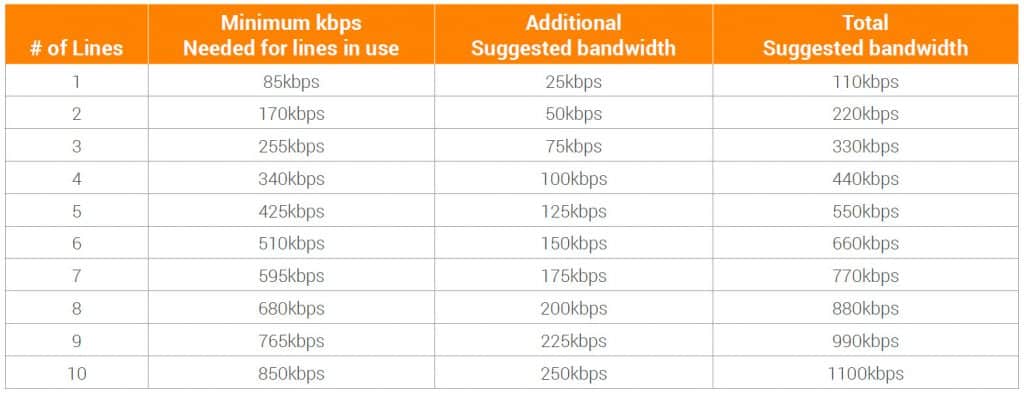
A – Rule of thumb is to have 85kbps for every line or concurrent call.
Here is a matrix based on the number of lines with a suggested minimum requirement to ensure your bandwidth is sufficient for the service needed.
For more information visit http://support.vonagebusiness.com/app/answers/detail/a_id/988
Networking
Hosted Voice-over-IP (VoIP) telephone service is different than traditional phone systems because communications from the phones travels over IP networks (your local computer network and the Internet) rather than over the traditional Public Switched Telephone Network (PSTN). Vonage Business Solutions service requires specific equipment and proper configuration of your network. This includes a high-speed internet connection, a modem, a router, and digital VoIP phones. Depending on the number of employees using the service, you may also need a switch. While our technicians are responsible for general installation support, diagnostics, and recommendations, it may be necessary to contact your professional IT administrator to implement our recommendations.
Note – Wireless internet service providers are not a good choice for VoIP service because the transmission is not always strong and consistent. This can result in poor sound quality. DSL, Cable, Fiber, and T1 connections deliver the clearest connection for VoIP service.
Network Equipment Setup & Compatibility Guide
SMALL OFFICE / HOME OFFICE ROUTERS
The following devices will often work with our service when properly configured. Please consult a network professional to ensure these settings are in place.
|
Manufacturer |
Model |
Features |
Price Range |
Setup and Notes |
|
Apple Airport Extreme |
A1354, A1408, A1521 |
$$ |
No changes necessary Replace if Wireless G Model |
|
|
Cisco |
RV042/RV082/RV016 |
Dual WAN, 4/8/16 ports |
$$ |
Disable load balancing |
|
Cisco |
RV120 |
$$ |
Disable Attack Checks, Disable SIP ALG, Replace |
|
|
Cisco |
RV180W |
Untested, Gigabit Ethernet, VPN, Wireless N |
– |
|
|
Cisco |
WVR210-A v1 |
– |
Check for new firmware, Disable SIP ALG and SPI Firewall. Replace. |
|
|
Cisco / Linksys |
E4200 v1 |
Dual-Band, Wireless N, Gigabit |
$$ |
Turn off SPI Firewall and SIP ALG |
|
D-Link |
DIR-615 Rev. B |
– |
Disable SIP ALG |
|
|
D-Link |
DIR-625 |
– |
Disable SIP ALG. Not suitable for more than 4 phones. |
|
|
D-Link |
DIR655 Rev A |
– |
Disable SIP ALG |
|
|
D-Link |
EBR2310 |
Wired Router |
$ |
Disable SIP ALG and SPI Firewall |
|
D-Link |
EBR2310 Rev C |
$$ |
Enable SIP ALG, replace. |
|
|
D-Link |
WBR2310 |
Wireless-G |
$ |
No changes necessary. |
|
Linksys |
E900 |
– |
Disable SIP ALG and SPI Firewall |
|
|
Linksys |
E1200 |
– |
Disable SIP ALG and SPI Firewall |
|
|
Linksys |
E2500 |
– |
Disable SIP ALG and SPI Firewall |
|
|
Linksys |
E3200 v1 |
802.11a/b/g/n |
$$ |
Disable SIP ALG and SPI Firewall |
|
Linksys |
E3500 |
– |
||
|
Linksys |
EA4500 v1 |
Gigabit, Wireless N |
$$ |
Disable SIP ALG and SPI Firewall |
|
Linksys |
EA6900 |
$$$$ |
Disable SIP ALG and SPI Firewall |
|
|
Linksys |
RV042 RV082 |
Dual WAN, 4 ports |
– |
Disable SIP ALG and SPI Firewall |
|
Linksys |
RVS210 |
– |
Only 4 phones can register. Replace if more than 4 phones needed. |
|
|
Linksys |
WRT54G Series |
802.11b/g |
$$ |
Compatibility varies depending on Model and Hardware Version. |
|
Linksys |
WRT610N |
– |
Upgrade to latest firmware Disable SIP ALG and SPI Firewall |
|
|
MikroTik |
Any |
$$ |
Disable SIP ALG |
SMALL OFFICE / HOME OFFICE ROUTERS (CONTINUED)
The following devices will often work with our service when properly configured. Please consult a network VONAGE BUSINESS SOLUTIONS professional to ensure these settings are in place.
|
Manufacturer |
Model |
Features |
Price Range |
Setup and Notes |
|
Netgear |
DG834G |
DSL Modem/Router |
$$ |
Disable SIP ALG, DoS and Port Scan Protection |
|
Netgear |
FVG318 |
– |
Disable SIP ALG. If issues continue, update firmware. |
|
|
Netgear |
FVS318 |
$$ |
Try to disable SIP ALG and SPI Firewall. |
|
|
Netgear |
FVS336G |
$$$$ |
Update firmware and Disable SIP ALG |
|
|
Netgear |
R6300 v1 |
Gigabit, AC1750, Dual Band |
$$$$ |
Update firmware and Disable SIP ALG and Port Scan and DoS Protection |
|
Netgear |
WGR614 |
Wireless-G |
$ |
Disable SIP ALG and Port Scan and DoS Protection (Hardware Version V8 and newer only) |
|
Netgear |
WNDR3300 |
N300, Dual Band |
$$ |
Disable SIP ALG and Port Scan and DoS Protection |
|
Netgear |
WNDR3400 |
N600, Dual Band |
$$ |
Disable SIP ALG and Port Scan and DoS Protection |
|
Netgear |
WNDR3700 v1 v3 v4 |
Gigabit, Wireless N, USB NAS Capability |
$$$$ |
Disable SIP ALG and Port Scan and DoS Protection |
|
Netgear |
WNR1000 v2 v3 |
$ |
Disable SIP ALG and Port Scan and DoS Protection. Update firmware. |
|
|
Netgear |
WNR2000 v2 v3 |
$ |
Disable SIP ALG and Port Scan and DoS Protection |
|
|
Netgear |
WNR3500L |
N300 |
$ |
Disable SIP ALG and Port Scan and DoS Protection |
|
WesternDigital |
MyNet N600 |
Dual Band, Wireless N, Hard Drive |
$$ |
Disable SIP ALG |
Modem/Router Gateway Devices
These devices are typically provided by an internet service provider. If the phones experience issues with registration and transfers, look first to disable SIP ALG or SPI Firewall settings. In the event that these settings aren’t available, most Modem/Router Gateways require bridging or replacement. Please see below for more details.
|
Manufacturer |
Model |
Features |
Price Range |
Setup and Notes |
|
2Wire |
Any |
– |
Disable SIP ALG and Attack Detection |
|
|
Actiontec |
GT704-WG-B, Most Models |
– |
Disable SIP ALG and SPI Firewall. If not present, Bridge device and use a third-party router. |
|
|
Actiontec |
PK5000 |
$ |
Disable SIP ALG at http://192.168.0.1/support/utilites (IP address may be different). Disable SIP ALG & SPI firewall. Or put into Bridge Mode. |
|
|
Ambit/Ubee |
U10C037, Any |
– |
Put into Bridge Mode/ replace. Incompatible with SIP |
|
|
Calyptix |
Any |
$$ |
Requires ISP Configuration |
|
|
Clear |
Modem/ Router |
– |
Disable firewall and set to pass-through mode. |
|
|
Comtrend |
Any |
– |
Disable SIP ALG in web interface, pictures here |
|
|
EdgeMarc |
Most Models |
$$ |
Remove option 66 settings. Remove SIP Server Address. |
|
|
Motorola |
3360 |
– |
Set Passthrough. |
|
|
Motorola |
2210 (MSTATEA) |
– |
Set Passthrough. |
|
|
Motorola |
NVG510 (Uverse) |
$ |
Disable SIP ALG. |
|
|
Motorola |
NVG589 (Uverse) |
– |
Disable SIP ALG and Firewall settings. Set Passthrough mode. |
|
|
Motorola |
SBG6580 |
$ |
Disable SIP ALG and set Pass-through mode. Update Firmware to 3.3 (requires ISP support) |
|
|
Motorola |
SBG901 |
– |
Bridge |
|
|
Motorola |
SBG941 |
– |
Bridge |
|
|
Motorola |
Surfboard |
– |
Running firmware v3.3 or higher. Disable SIP ALG. |
|
|
Netgear |
7550 |
– |
Netgear 7550Modem/Router Combo. AT&T Uses this |
|
|
Netopia |
Any, 3000 |
– |
Disable SIP ALG |
|
|
Pace |
Pace (Uverse) |
– |
Disable Attack Detection and Set Pass-through. Create custom service to allow SIP traffic for ports 5060-5080. |
|
|
Siemens |
SpeedStream 4200 |
$$ |
Disable SIP ALG in NAT tab |
|
|
Siemens |
SpeedStream 5100 |
$ |
Put in Bridge Mode and use a recommended router. |
|
|
SMC |
3100 |
– |
Bridge |
|
|
SMC |
8014 |
– |
Turn off Smart Packet Detection. Put into Bridge Mode. |
|
|
SMC |
D3G |
– |
Bridge |
|
|
U-Verse |
2-wire, Netgear, Pace, Other |
– |
Use Third-Party Router in DMZ |
|
|
Westell |
A90, B90, Most Models |
– |
Put into Bridge Mode. |
|
|
ZHONE |
Any |
$ |
Disable SIP ALG, Use Third-Party Router in DMZ |
|
|
ZyXEL |
P-660HW |
$ |
Disable SIP ALG |
|
|
ZyXEL |
P792H v2 |
$ |
Disable SIP ALG |
|
|
ZyXEL |
PK5001Z (Qwest, CenturyLink) |
$ |
Use telnet to disable SIP ALG |
Enterprise Equipment & Firewalls
Enterprise Equipment and Firewalls typically have rules restricting access to the network. It is important that the traffic destined for Vonage Business Solutions phones is not blocked. Please see below for details for your specific device.
|
Manufacturer |
Model |
Features |
Price Range |
Setup and Notes |
|
Adtran |
Netvanta |
$$ |
Disable SIP ALG |
|
|
Cisco |
All Enterprise-level devices |
$$$$ |
See Recommendations |
|
|
Cyberoam |
Any |
$$$$ |
Create Firewall Exception Rules |
|
|
DrayTek Vigor |
Any |
$$ |
SIP ALG must be turned off. |
|
|
Firebox |
Any |
$$$$ |
Disable SIP ALG, Create access rules. |
|
|
FortiGate |
FortiNet, Any |
$$$$ |
Disable SIP Helper. |
|
|
Juniper |
NetScreen |
$$$$ |
Disable SIP ALG and UDP Flood Protection |
|
|
Netgear |
ProSafe VPN Firewall |
$ |
Update to firmware 3.0.6-25 and disable SIP ALG |
|
|
Peplink |
Any |
$$ |
Set SIP Pass-through to Standard Mode |
|
|
Samsung |
Ubigate iBG1000 |
$ |
Requires ISP Configuration – Disable SIP ALG. |
|
|
SonicWALL |
Any |
$$ |
Disable SIP ALG, Enable Consistent NAT, and Create access rules (if necessary). |
|
|
ZyXEL |
ZyWALL 5, ZyWall USG 50/80/100 |
$ |
Disable SIP ALG, Check for new firmware. |
Compatible Phones
For a phone to work with Vonage Business Solutions’ service, it must be a SIP (session initiated protocol) capable
phone.
Note: Vonage cannot guarantee the compatibility or functionality of phones that were not purchased through Vonage, even if the phone is listed here.
OFFICIAL VONAGE PHONES
Official phones are those that have been extensively tested and are known to work well with Vonage’s service. These models are officially supported, and each release is tested to ensure continued compatibility.
- Cisco SPA30x/5xx including: 303, 501, 502, 504, 508, 509, 512, 514, and 525
- Linksys SPA: 921, 922, 941, 942, and 962
- Yealink: T19, T20, T21, T22, T26, T28, T32G, T38G, T41P T42G, T46G, VP530, and W52P
- Panasonic: TGP550
- Polycom SoundPoint IP Phones: 301, 320, 321, 330, 331, 335, 430, 501, 550, 560, 600, 601, 650, 670, 4000, 6000, and 7000
- Polycom VVX Phones: 300, 310, 400, 410, 500, and 600
- Grandstream GXP: 1405
- Counterpath Bria (PC or Mac)
- Counterpath X-Lite eyeBeam (PC or Mac)